
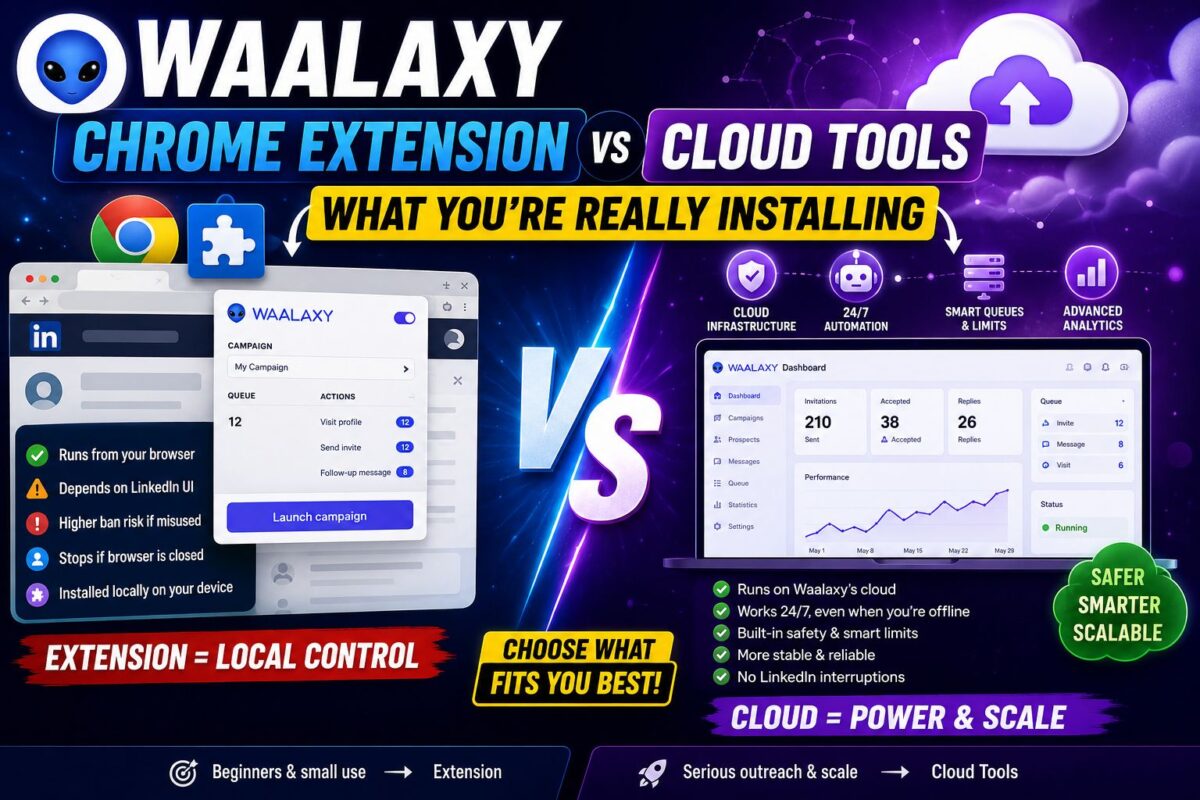
The Waalaxy Chrome extension is the part of the product most buyers never think about — until they realize it's the single biggest factor in the tool's price, its safety profile, and its one genuinely annoying limitation.
Waalaxy costs a third of what cloud competitors charge because of this architecture. It carries different risks because of this architecture. And it occasionally pauses your campaigns at the worst moment… because of this architecture.
Here's exactly what you're installing, how it works under the hood, and when the extension model is the right call versus a dealbreaker.
Key Takeaways
- Waalaxy = Chrome extension + desktop companion app — actions execute from your machine and IP
- The desktop app means campaigns run without babysitting a browser tab, but it's still not 24/7 cloud
- Extension architecture is why Waalaxy costs €19 vs Expandi's ~$79 — you're the infrastructure
- Best fit: solo users at conservative volume; wrong fit: agencies and always-on scale
What the Extension Actually Does
Install Waalaxy and two components land on your machine:
The Chrome extension integrates directly into LinkedIn's interface — it's how you import prospects from search results, and it's the bridge between LinkedIn's pages and Waalaxy's campaign engine.
The desktop companion app is the executor. It maintains a browser environment that performs your queued actions — sending invites, firing follow-ups, detecting replies — on schedule with randomized human-like delays, even when you're not actively watching a Chrome tab.
The mental model: the extension is the cockpit, the desktop app is the autopilot. Neither is a remote server. Everything runs locally, from your IP, with your browser fingerprint.
Why This Architecture Exists (Follow the Money)
Cloud automation is expensive to operate. Expandi maintains dedicated residential IPs and always-on cloud browser instances per customer — infrastructure you pay for in its ~$79+/month price.
Waalaxy's model outsources the infrastructure to you. Your machine, your IP, your electricity. That's not a criticism — it's the entire reason a solo founder can get real automation for €19/month (≈€9.50 annual) instead of $950+/year.
Every Waalaxy-vs-cloud debate is downstream of this one design decision. You're not comparing feature lists; you're comparing who owns the infrastructure.
The Honest Limitation: Environment Dependency
Here's the annoyance nobody discovers until week two: your campaigns run when your environment runs.
Laptop closed all weekend? Actions queue and wait. Desktop app not launched after a restart? Nothing sends, silently. Waalaxy's desktop companion dramatically softened the old “keep the tab open” problem, but it's mitigation, not elimination — a cloud tool's campaigns simply don't know your laptop exists.
Practical impact varies wildly by user:
- Daily computer user: near-zero impact. Your machine is on during business hours anyway — which is exactly when actions should fire.
- Travel-heavy or often offline: real friction. Campaigns stall during your off-grid days.
- Agency running client accounts: disqualifying. Client campaigns can't depend on anyone's laptop habits.
The Safety Dimension (Short Version)
The extension model means LinkedIn sees automation actions coming from your real IP and real browser fingerprint — a detectable surface that cloud tools with dedicated IPs don't expose the same way.
The counterweight: your session looks like you, because it is you. No datacenter logins, no location hopping. The architecture fails when behavior looks robotic — volume spikes, identical messages, robotic timing — not because the environment itself raises flags.
The full risk analysis, ban-report patterns, and my safe-limits playbook live in my dedicated post on LinkedIn ban risk explained — required reading before your first campaign. The short version: at under ~100 invites/week with personalized messages, extension users rarely report problems; I logged zero warnings across 600 invites in 30 days.
Install the Extension Free — 80 Invites/Month to Test the ArchitectureExtension vs Cloud: The Decision Table
| Factor | Waalaxy (Extension + App) | Cloud Tools (Expandi-style) |
|---|---|---|
| Price | €19-69/mo, 50% off annual | ~$79+/mo |
| Runs 24/7 without your machine | ✗ | ✓ |
| IP exposure | Your real IP | Dedicated residential IP |
| Session anomalies | None (it's your session) | Low (consistent assigned IP) |
| Setup complexity | 15 minutes | Hours |
| Multi-account isolation | ✗ | ✓ |
| Infrastructure you maintain | Your computer | None |
The pattern: extension architecture trades convenience and structural safety margin for a 3-4x price advantage. Neither side of that trade is wrong — it depends entirely on your volume and what your account is worth.
Setup Notes That Save You Headaches
Three extension-specific practices from my 30 days:
1. Launch the desktop app on startup. Add it to your login items so a reboot never silently pauses campaigns. The “stuck campaign” support ticket is almost always this.
2. Keep Chrome logged into LinkedIn — one account only. The extension binds to your active LinkedIn session. Multiple LinkedIn accounts in one browser profile confuse it; use separate Chrome profiles if you must.
3. Don't run other LinkedIn extensions alongside it. Scrapers, auto-likers, even some CRM extensions inject into the same pages. Conflicts cause weird behavior, and stacked automation multiplies detection risk.
Full first-campaign walkthrough — import, sequences, message templates, quotas — in my Waalaxy setup guide.
Who Should Choose Extension Architecture
The extension model fits you if: you're a solo founder, freelancer, consultant, or recruiter; your volume stays under ~400 invites/month; your computer is on during working hours; and the 3-4x price saving funds better things.
Go cloud instead if: you run multiple accounts, need true 24/7 execution, have a restriction on your record, or your LinkedIn account is business-critical infrastructure. The cloud-based options are ranked in my roundup of cloud-based alternatives.
And for the complete picture of the tool wrapped around this extension — features, pricing traps, 30-day campaign numbers — see my honest Waalaxy review.
See If the Extension Model Fits You — Try Waalaxy FreeFAQ
Does Waalaxy work if I close Chrome? Mostly yes — the desktop companion app executes actions without an open Chrome tab. But your machine must be on and the app running.
Can LinkedIn detect the Waalaxy extension? LinkedIn can detect extension-driven interaction patterns. Waalaxy mitigates with randomized delays and human-like pacing; behavior (volume, message uniqueness) determines your actual risk.
Is there a fully cloud version of Waalaxy? No — the extension + desktop app model is the product. Cloud execution means switching tools.
Does the extension slow down my browser? Marginally, on LinkedIn pages only. I measured no meaningful impact elsewhere.
Firefox or Safari support? No — Chrome (and Chromium-based browsers) only.
The Waalaxy Chrome extension is a deliberate bargain: you supply the machine and accept the environment dependency, and in exchange you get real LinkedIn automation at a quarter of cloud prices — a trade that's excellent for solo operators and exactly wrong for agencies.
Add Waalaxy to Chrome — Free Plan, 2-Minute Install