
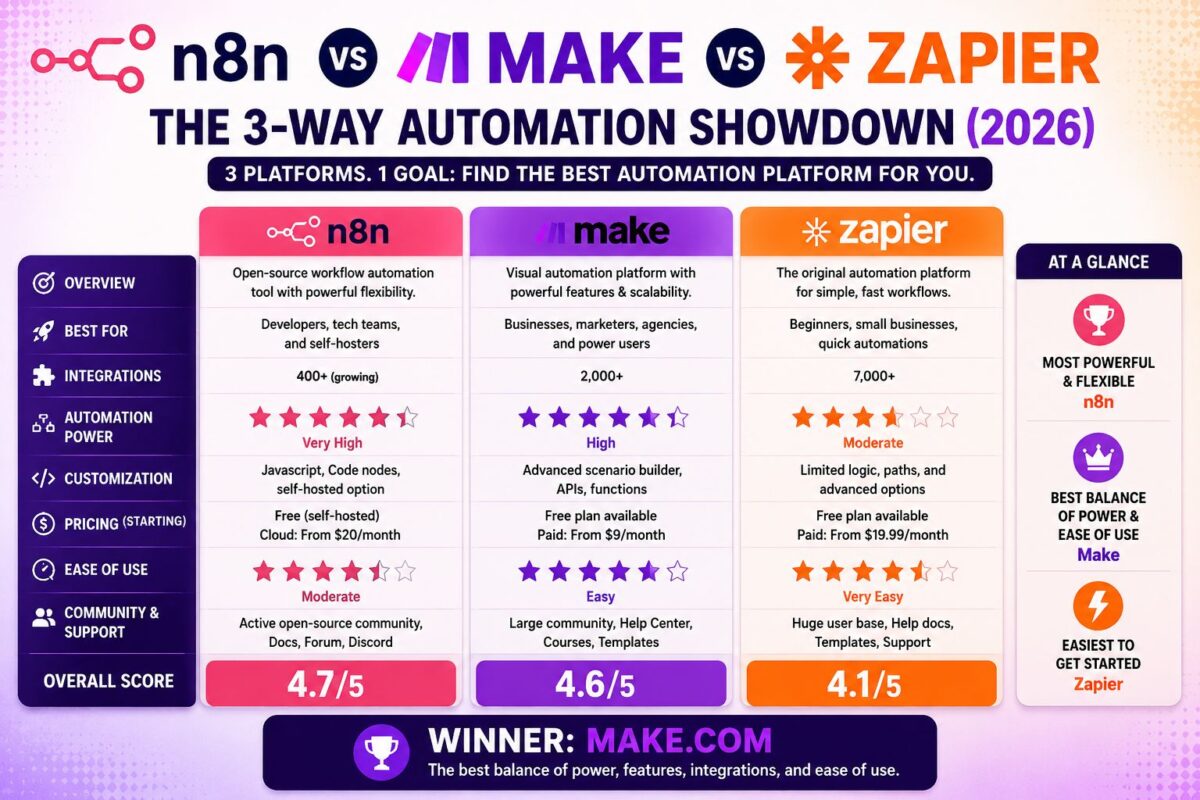
The n8n vs Make vs Zapier decision has a shortcut most comparison posts bury: each platform wins exactly one dimension outright — Zapier wins ease, Make wins hosted value, n8n wins control — and your priority ranking of those three words is your answer. This post exists to pressure-test that shortcut with a proper decision matrix, not to rehash pairwise arguments.
(For deep pairwise analysis, we've done those separately: Make vs Zapier with our 90-day cost data, and Make vs n8n on the convenience-vs-control axis.)
Key Takeaways
- Zapier: 8,000+ integrations, easiest onboarding, most expensive at volume (from $19.99/mo for 750 tasks)
- Make: best hosted price-to-power ratio (~$0.001/credit on Core), visual branching, moderate learning curve
- n8n: free self-hosted option, per-execution billing, full code control — G2's highest-rated of the three at 4.8/5
- Search interest ranks them n8n > Zapier > Make in 2026 — developer momentum is real, but popularity isn't fit
The Nine-Category Scorecard
| Category | Zapier | Make | n8n |
|---|---|---|---|
| Ease of use | 🥇 | 🥈 | 🥉 |
| Integrations | 🥇 8,000+ | 🥈 3,000+ | 🥉 (unlimited via code) |
| Price at volume | 🥉 | 🥈 | 🥇 |
| Complex logic | 🥉 | 🥇 | 🥇 |
| Self-hosting | ✗ | ✗ | 🥇 |
| Error handling | 🥉 | 🥇 | 🥈 |
| AI agents | 🥉 Central layer | 🥈 Native, transparent | 🥇 Multi-step depth |
| Official support | 🥇 | 🥇 (all paid plans) | 🥉 (cloud only) |
| Non-technical friendliness | 🥇 | 🥈 | 🥉 |
Three honest observations from that table:
Zapier's medals cluster at the edges — easiest and broadest, but weakest wherever workflows get sophisticated or bills get scrutinized.
Make never finishes last. It's the compromise candidate in the best sense: near-n8n power with near-Zapier usability, at the lowest hosted price.
n8n's wins require earning. Every gold assumes technical capacity — self-hosting means you run the servers, and “unlimited integrations via code” means you write the code.
The Billing Models, Decoded in 60 Seconds
This is where the three genuinely diverge:
- Zapier bills per task (action steps only — triggers and filters free). Simple, and expensive: complexity and volume both inflate the bill.
- Make bills per credit (every module execution — triggers and filters included). Cheap per unit (~$0.001 on Core), but loops and polling multiply consumption. Full mechanics in our Make pricing breakdown.
- n8n cloud bills per execution (a 50-step workflow = 1 execution). Self-hosted is free software plus server costs.
Cost ranking by workflow shape: short and simple → all affordable; long and complex → n8n wins big; branchy but moderate → Make's sweet spot; anything at Zapier scale → check your invoice.
The Decision Matrix
Find your row:
| You are… | Pick | Why |
|---|---|---|
| A non-technical solo founder | Zapier | Ship today, optimize never |
| A budget-conscious marketer/ops person | Make | 90% of the power, fraction of the price |
| A developer or dev-backed team | n8n | Control, code, and per-execution economics |
| An agency serving enterprise clients | n8n (client work) + Make (internal) | The hybrid pattern real agencies use |
| Building AI-heavy workflows, no-code | Make | Native agents since Feb 2026, transparent reasoning |
| Building AI-heavy workflows, with code | n8n | Deepest multi-step agent tooling |
| Locked into a niche app's ecosystem | Zapier | The long tail lives there |
What About Everything Else?
The big three aren't the whole market — Pabbly's lifetime deals, Gumloop's AI-first design, Activepieces' flat per-flow pricing, and Workato's enterprise machinery all beat the trio for specific situations. We ranked the full field in our 11 best Make.com alternatives guide.
Our Position, For What It's Worth
We run Make in production — the full 90-day review explains why, with real cost data and the failures included. But we'd tell a developer with a spare VPS to run n8n without hesitation, and we'd tell a non-technical founder drowning in busywork to just buy Zapier and move on with their life. Tools don't have universal winners; situations do.
Test the compromise candidate — build one real workflow on Make freeThe Same Workflow, Built Three Ways
Nothing exposes platform character like building one identical workflow everywhere. Our test case: form submission → spam filter → CRM lookup → create task → notify Slack.
In Zapier: a five-step vertical list. Built in 8 minutes — fastest of the three. Trigger and filter are free; billing counts 2-3 tasks per run. Debugging means reading step logs top to bottom. Perfectly fine, slightly opaque, done.
In Make: a five-module canvas chain. Built in 14 minutes including the Run-once test ritual. Bills 5 credits per run (everything counts). Debugging is the standout — clicking any module shows exactly what data entered and left it, and the whole flow reads at a glance.
In n8n: a five-node graph, nearly identical topology to Make. Built in 19 minutes — the extra time went to configuration fields that assume API familiarity (“resource,” “operation” dropdowns mirroring endpoint structures). Bills as 1 execution per run regardless of node count. Debugging offers code-level inspection plus one-click node deactivation for isolation testing — the most powerful toolkit, behind the steepest vocabulary.
The build times tell the ease story; the billing units tell the economics story; the debugging experiences tell the daily-life story. Multiply each by a hundred workflows and a few years, and you have the real comparison — which is why we keep insisting the “winner” is a function of who's asking.
Build this exact workflow yourself — 14 minutes on Make's free planSwitching Costs: What Changing Platforms Actually Involves
One factor the feature tables hide: none of these three can import the others' workflows. Every migration is a rebuild, so the real question is how expensive rebuilding is in each direction.
Cheapest moves: Zapier → Make (linear zaps map trivially onto the canvas; most rebuilds take minutes per zap) and Make → n8n (concepts transfer — scenarios become workflows, modules become nodes — you're mostly relearning UI plus optionally adding code).
Most expensive move: n8n → anything. Once workflows contain custom JavaScript nodes, no visual platform can absorb them; you're re-architecting, not translating.
The practical takeaway for the three-way decision: err one step more technical than you think you need. Moving up the technical ladder later (Zapier → Make → n8n) is cheap; every step also teaches concepts the next platform reuses. Moving down happens rarely and usually means abandoning capability you built. If you're genuinely torn between two adjacent options, pick the more technical one and keep its free tier as your fallback.
FAQ
Which is best overall: n8n, Make, or Zapier? No universal answer — Zapier for ease, Make for hosted value, n8n for control. Rank those priorities and you have your tool.
Which is cheapest? Self-hosted n8n (free software + server costs) for the technical; Make's Core plan (~$9-12/month, 10,000 credits) for everyone else.
Can I use more than one? Yes, and agencies commonly do — n8n for client deployments requiring data ownership, Make or Zapier for internal speed.
Which has the best AI capabilities in 2026? Make for accessible native agents with transparent reasoning; n8n for complex multi-step agents under full control; Zapier's Central works best for simple, predictable 3-5 step flows.
Final answer on n8n vs Make vs Zapier: ease, value, control — pick the word that matters most, and the matrix above does the rest.
